This guide provides a practical B2B decision framework. Final specifications, market obligations, testing scope, labels, packaging and shipment requirements must be confirmed for the exact finished SKU and destination.
2. Direct-answer introduction
LCD writing tablet classroom set management works best when the school or distributor treats the tablets, styluses, batteries, labels, storage furniture, and replenishment stock as one controlled system—not as a box of low-cost individual devices. The practical model is simple: define a standard classroom kit; give every tablet and stylus a visible identity; issue and reconcile kits at a fixed handoff point; clean them with a product-safe routine; separate exceptions immediately; and reorder against measured loss and defect data.
An LCD writing tablet is usually a single-purpose reflective writing surface. A user writes on a pressure-responsive liquid-crystal display with a stylus or fingertip, then clears the image with an erase control. Many classroom-oriented models are passive devices with no radio, account, or network connection. Some use a replaceable button or coin cell to power the erase function; others use a rechargeable battery and charging port. Exact display behavior, stylus retention, lock feature, dimensions, power architecture, and included accessories vary by model. A purchase order must therefore describe the selected configuration rather than rely on a generic product name.
At scale, operational consistency is more valuable than a sophisticated asset platform. A classroom can manage a 30-unit tray set with a printed roster and a teacher check; a district can add barcode or QR identifiers and a central exception log. Both can use the same control principle: the expected count, location, custodian, and condition of each unit must be knowable at handoff and at return. This aligns with the asset-inventory discipline recognized in NIST’s security and privacy control catalog, even though a classroom tablet set is not an information system in the usual sense.1
This guide is about managing a deployed set after procurement. It does not compare screen sizes, decide between rechargeable and coin-cell designs, or provide legal advice for a particular market. It gives procurement teams, education distributors, and program managers a repeatable operating design they can adapt to the exact LcdWritingTablet model and destination requirements.
3. Who this guide is for
This guide is written for education distributors and importers that bundle tablets into school-ready kits; school groups, district procurement teams, and education program operators that deploy a common device across many rooms; and OEM/ODM buyers that want packaging, labeling, and inspection requirements aligned with real classroom workflows. It is also relevant to learning-center operators and non-profit programs that need dependable redistribution between sites.
The guide assumes a shared-set model. In that model, devices are issued to a class, teacher, cart, library, or learning station and must return to controlled storage. A one-to-one, take-home program has different risks: family communication, home replacement terms, and transport rules become more prominent. The same kit logic still applies, but the accountable custodian changes from a room to an individual borrower.
The decision maker should assign four named roles before requesting quotations. The program owner sets the instructional use and deployment date. The procurement owner fixes the bill of materials, documentation, and acceptance criteria. The site owner controls storage and staff training. The supplier contact confirms model-specific capabilities, packing configuration, pre-shipment inspection access, and replacement part availability. Without these responsibilities, missing styluses and unclear defect claims tend to become informal disputes after delivery.
LcdWritingTablet can support an OEM/ODM discussion around classroom kitting, asset labels, instructional inserts, and replenishment packs. The buyer should retain responsibility for local operating policy, age-appropriate use, and destination-market obligations. Where the product includes a wireless function, imported radio equipment has a different compliance path from a non-radio tablet; for example, the FCC states that RF devices subject to its rules need the appropriate authorization before U.S. marketing or importation.6
4. Buyer decision framework
Start with the unit of accountability
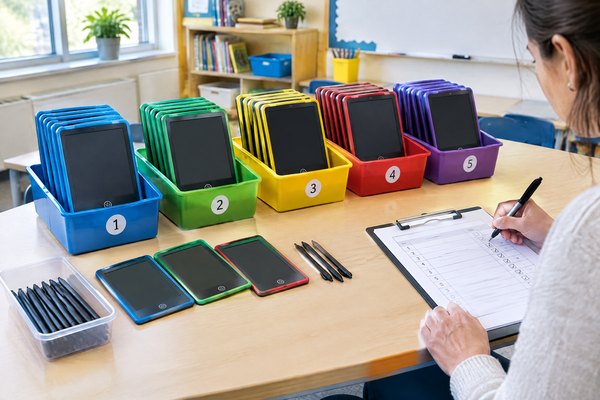
Do not make the individual tablet the only unit that staff must manage. Define a classroom kit first. A useful kit might contain a fixed quantity of numbered tablets, the same quantity of numbered styluses, a labeled tray or case, a quick-start and cleaning card, and a place for exceptions. The kit receives a kit ID, such as SCHOOL-A / ROOM-12 / KIT-03; each tablet then receives a child ID, such as KIT-03 / 01–30.
This hierarchy reduces reconciliation time. A teacher returns one kit to one location and checks thirty visible pairs, rather than searching a stockroom for thirty anonymous devices. It also makes stock transfers auditable: the record states that KIT-03 moved from Room 12 to the library, not that several loose tablets disappeared from a general pool.
Make decisions from the failure mode, not the unit price
Before choosing a packing and operating model, list the expected failure modes: lost stylus, missing tablet, unresponsive erase action, display damage, stuck lock control, battery depletion, dirty surface, or incorrect kit location. For each failure mode, define its detection point, immediate action, owner, and replenishment source. A practical rule is that any exception should have a place to go other than back into the working kit.
For example, a missing stylus at lesson close becomes an open count discrepancy. The teacher checks the floor and desk area, marks the exception, and returns the kit. The site owner resolves it from a compatible stylus reserve or investigates it the same day. A tablet that does not erase is isolated in a clearly marked quarantine pouch. It should not circulate because its presence hides the real usable count.
Choose the control level that matches the deployment
A single classroom may only need a laminated count sheet. A campus cart may need a checkout log. A multi-site program may need a spreadsheet or asset system that records kit ID, location, custodian, received date, service status, and replacement history. The control method matters less than the routine: update it at the moment of transfer, not from memory at the end of the week.
A good buyer requirement is visible, durable identification without obscuring safety labels, controls, display area, ports, or regulatory markings. Specify whether labels are sequential, pre-applied, supplied loose, or applied locally. For removable labels, pilot their adhesive against the proposed cleaning method and storage temperature. A label that curls or leaves residue makes asset control worse, not better.
Build a policy that is teachable in 30 seconds
The classroom routine should be short enough to execute in a busy transition. A strong close-out instruction is: “Write or clear, return tablet to its numbered slot, return stylus to the matching slot, show the tray to the teacher.” Add one adult verification step for the end of the day. Complex accountability systems fail when they depend on teachers conducting long administrative tasks after every activity.
Operating principle: A set is available only when its count, location, and condition are known. A device that is present but unserviceable belongs in the exception process, not in the available count.
5. Comparison, cost, quality, and specification table
The following table is a procurement planning tool, not a product specification. Confirm all selected features, dimensions, accessories, and electrical details in the approved sample, purchase order, and final packing list.
| Management choice | What to specify to the supplier | Cost or quality implication | Operational recommendation |
|---|---|---|---|
| Individual retail packs | Retail carton contents, labels, and whether cartons remain in service | More packaging and more loose pieces to handle | Use only if the program needs individual take-home distribution; otherwise request bulk classroom kitting. |
| Numbered classroom kit | Tablets, styluses, tray/case, slots, kit label, count card, and spare allocation | Adds packing and labeling work but shortens reconciliation | Make the kit the standard issue and return unit. |
| Tethered or retained stylus approach | Retention method, attachment point, material, pull/handling expectations, and no-interference requirement | Can reduce loose-stylus loss; may add parts and create a new break point | Pilot with the intended age group; do not assume it suits every model or classroom activity. |
| Loose stylus with reserve pack | Exact compatible stylus SKU, color, tip, dimensions, pack quantity, and separate SKU | Lower initial assembly complexity; recurring replacement demand | Hold compatible styluses at site level and record monthly consumption. |
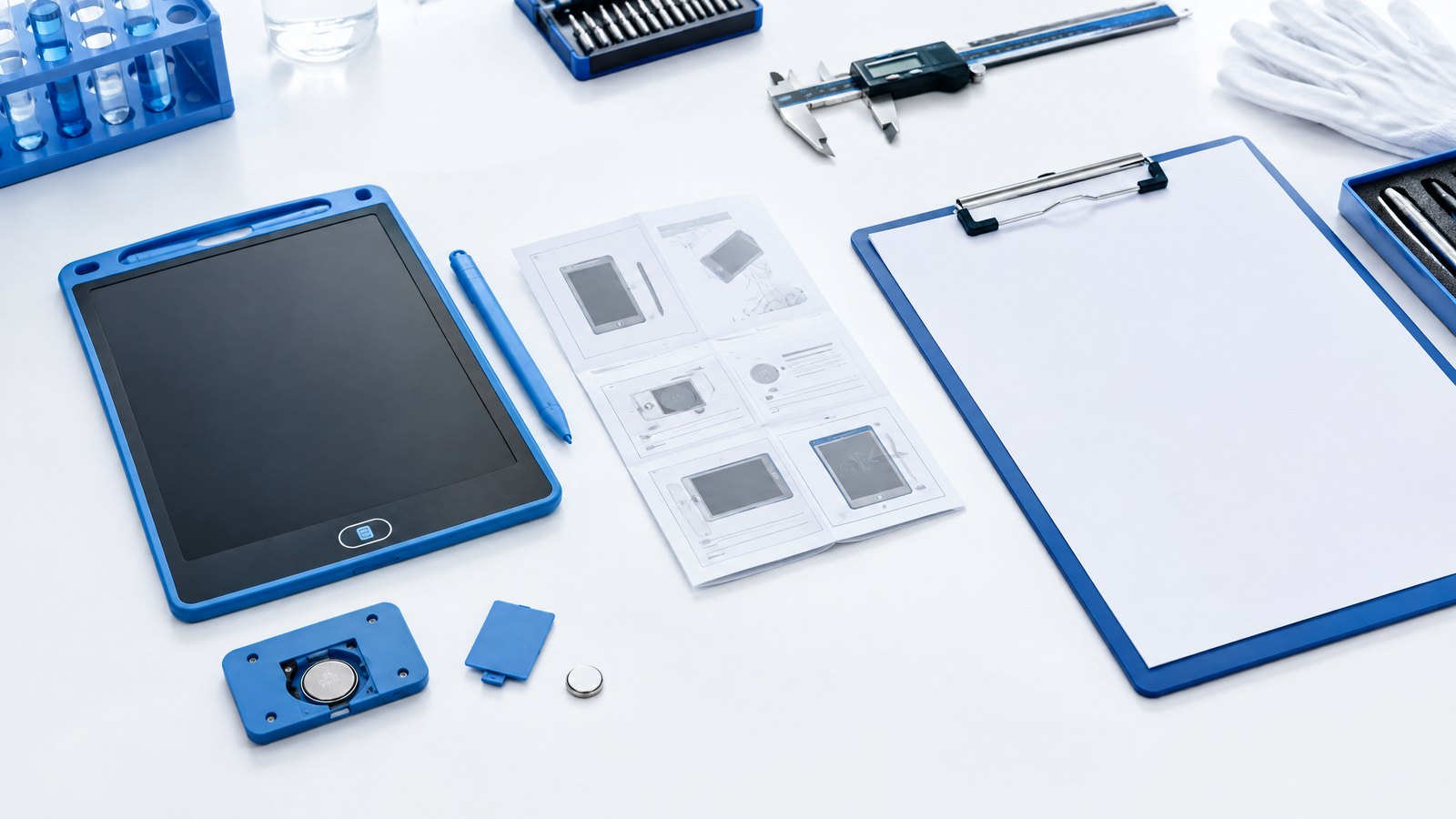
| Replaceable button/coin cell design | Battery type, compartment construction, tool requirement, labels, instructions, and battery sourcing | Simplifies a no-charging routine but needs controlled replacement and safe storage | Restrict battery changes to designated adults; keep cells out of classroom-accessible supply. |
| Rechargeable design | Cell chemistry, nominal capacity, port/cable, charger, charging instructions, transport documentation, and service limits | Adds charging equipment, cable control, and battery transport considerations | Use a managed charging location and never mix loose, damaged, or unidentified units. |
| Pre-applied asset labels | Label material, numbering sequence, placement drawing, scan format, and spare labels | Small per-unit customization cost; high value for traceability | Request a first-article photo or physical sample before mass labeling. |
| Reserve stock | Separate line items for tablets, styluses, batteries where applicable, trays, and printed cards | Ties up a modest buffer but prevents a kit from becoming unusable | Size the reserve from pilot data and lead time; do not use a guessed percentage as a permanent rule. |
| Inspection standard | Sampling plan, defect definitions, functional checks, cosmetic thresholds, and reporting format | Adds clarity and may add inspection cost | Write acceptance criteria before production, not after a delivery problem. |
The total cost of ownership is not the tablet price multiplied by the number of learners. It includes kit assembly, identification, storage equipment, staff time, consumables, reserve inventory, shipping mode, inspection, and retirement handling. A buyer should ask for these costs as separate line items where possible. This makes it easier to compare a low unit price with a configuration that creates higher local handling cost.
6. Product, application, and technical detail
Translate device behavior into a classroom workflow
A conventional LCD writing tablet is not a tablet computer. Its writing surface is typically intended for temporary marks, and its erase feature usually requires power while writing itself may not. That difference matters operationally. Staff should be taught that an erase failure is not necessarily a broken screen; it may be a lock setting, depleted power source, poor contact at a battery compartment, or a device defect. The troubleshooting card should follow the model-specific manual, not improvisation.
The buyer should request a clear approved configuration record. At minimum, it should name the model/SKU, display size, housing color, display color mode if applicable, erase mechanism, lock function if applicable, power source and battery designation, stylus quantity and retention approach, accessory list, carton quantity, net/gross weights, label artwork, instructions language, and version date. Photographs of the front, rear, battery compartment or charge port, stylus, label location, and packaging close ambiguity later.
If the model has a lock control, define its instructional role. A teacher may use it to preserve a pupil’s completed work while circulating, but it should not be assumed to protect sensitive information. A non-networked LCD tablet normally offers no user account or cloud storage; nonetheless, the content on the visible screen can be seen by anyone holding it. Keep names, assessment answers, and other personal information to the minimum needed for the activity, and require erasure before transfer to another group.
Storage is a design decision
The best storage is a numbered, dry, access-controlled location that makes a missing unit obvious. A tray with one shaped position per tablet and one position per stylus is usually easier to audit than a deep bin. Place the count card where the person returning the kit can see it before closing the cabinet. Reserve devices and loose accessories should be stored separately from active kits; otherwise, the reserve silently becomes unrecorded classroom stock.
Avoid piling tablets under books, leaving styluses in shared stationery cups, or storing units against conditions the selected manual warns against. Do not put charging instructions on a non-rechargeable kit, and do not place a rechargeable kit in a cabinet with no power-management plan. The physical arrangement should reinforce the policy without requiring staff to remember exceptions.
Cleaning and care without overclaiming
Create a model-specific cleaning instruction and have it reviewed against the device manufacturer’s guidance and the selected cleaning product label. As a general school-health baseline, CDC advises routine cleaning and sanitizing of often-touched surfaces and objects, including hands-on learning items.2 That does not mean every tablet surface should receive every disinfectant. EPA explains that a disinfectant’s directions for use, permitted surfaces, precautions, and contact time are product-specific.3
For routine care, have staff remove visible soil with a clean, soft cloth using only the method approved for the device. Do not spray liquid directly into buttons, ports, seams, or battery compartments. If a disinfectant is required by site policy, first confirm its label allows the relevant use, follow its safety and contact-time directions, and confirm that the device guidance permits the method. Keep wet products away from open battery compartments and do not return a damp unit to a closed storage tray. Cleaning should be part of a defined close-out process, not an unsupervised activity with a communal spray bottle.
Stylus and battery policies prevent most interruptions
Styluses should be treated as controlled accessories. Match their asset number to the tablet slot or kit number, prohibit substitutes unless verified compatible, and keep a recorded reserve. A program that distributes a generic box of pens as replacements may damage screens or create inconsistent writing performance. If the stylus is designed to be detachable, loss is foreseeable; plan for it instead of treating every missing stylus as a supplier warranty issue.
For a coin-cell or button-cell model, allow only trained designated adults to open the compartment and replace a cell. Record the date, battery type, unit ID, and person completing the task. In the United States, consumer products within the scope of the applicable button/coin-cell rule have requirements covering secure access, warnings, and instructions; CPSC identifies ANSI/UL 4200A-2023 as the incorporated mandatory standard for covered products.4 The importer and responsible party must determine the product’s actual classification, intended use, and applicable rules; a school operating procedure does not itself establish compliance.
For rechargeable models, identify the approved cable and power source, where charging occurs, who can charge, and what staff must do with swelling, heat, leakage, physical damage, or other unusual conditions. Remove such units from use and follow the manufacturer’s safety instructions. Do not send a battery or battery-powered device identified as safety-defective or damaged by air without expert direction: IATA states that batteries with the potential to create dangerous heat, fire, or short circuit are forbidden for air transport, including when installed in equipment.5
7. Sample, testing, and quality-control workflow
A classroom deployment should begin with an operational pilot, not a full-volume release. The goal is not to prove that a device can write once. It is to test whether the complete kit can survive real issuing, return, cleaning, storage, and exception handling without confusing staff.
First, approve a pre-production sample against a written checklist. Check that the model, color, logos if ordered, asset-label placement, label sequence, instruction language, stylus version, tray slots, pack count, and outer-carton marks match the approved artwork and purchase order. Operate the erase function and any lock control on every sample. For a battery-powered model, inspect the compartment or charge port and verify that the manual and battery information match the selected configuration. These are confirmation checks, not a substitute for accredited compliance testing where that is needed.
Second, run a small controlled pilot at one or two representative sites. Include the people who will actually issue and return the devices: a teacher, teaching assistant, librarian or equipment coordinator, and cleaner or facilities representative where relevant. Run several complete cycles: delivery to room, learner use, a normal return, a rushed transition, a missing-stylus event, a unit that fails to erase, and cleaning before storage. Record time to issue, reconciliation time, count discrepancies, damaged labels, stylus retention issues, and staff questions. These observations determine whether the kit instructions are workable.
Third, convert the pilot findings into acceptance criteria for the larger order. Define major and minor defects in plain language. Examples include wrong or unreadable asset number; missing stylus; incorrect tray count; erased function not operating under normal procedure; cracks or damaged housing; unreadable instructions; loose battery cover; wrong logo or artwork; and carton quantity mismatch. State what evidence is required in a pre-shipment report: lot identifier, sample size, photos, function-check results, defect log, carton count, and corrective-action status.
For bulk orders, distinguish between factory quality control and independent pre-shipment inspection. Factory control is the supplier’s process for verifying production against the agreed specification. An independent inspection, if the buyer chooses one, checks a selected sample against the buyer’s written criteria before final balance payment or shipment release. Neither label should be used as a blanket promise that every individual unit will be defect-free. The value comes from agreed methods, documented findings, and a clear disposition for failures.
Before authorizing production, email the chosen kit layout, sequential label file, desired spare-part SKUs, intended market, destination, and inspection checklist to info@lcdwritingtablet.com. Ask for written confirmation of what the selected model can support; do not assume features shown on another model or in a generic image apply to your order.
8. Ordering and implementation preparation
Write a classroom-set purchase order, not only a product order
The purchase order should identify the bill of materials by line item. State the quantity of active kits, units per kit, styluses per kit, reserve tablets, reserve styluses, trays/cases, labels, manuals, and any battery or charging accessories. Specify whether reserves are packed separately and given their own SKU. Add a kit packing diagram and carton-marking text. If there is customization, identify artwork revision, approval date, and color reference process.
Add operational requirements that are easy to miss: sequential asset IDs; matching tablet, stylus, and tray numbering; a durable count card; barcodes or QR codes if required; no labels over warnings or controls; and packaging that prevents loose accessories from moving in transit. When the buyer will build kits locally, request bulk quantities with a packing list that makes local kitting feasible. When the factory will build kits, require a first-article kit approval before mass assembly.
For rechargeable configurations, make transport documentation part of the procurement pack. IATA’s guidance classifies lithium-ion batteries contained in or packed with equipment as UN3481 and notes that manufacturers and subsequent distributors generally must make the applicable UN 38.3 test summary available, with an exception noted for button cells installed in equipment.5 This is transport guidance, not a substitute for confirming the exact shipment mode, battery configuration, carrier rules, and legal responsibilities with the shipper and importer.
If products are to be placed on the EU market, maintain a separate compliance review instead of assuming that a battery fact sheet settles all obligations. The European Commission describes Regulation (EU) 2023/1542 as the new Batteries Regulation and notes its life-cycle focus, including rules related to portable-battery removability and replaceability.7 The applicable product rules depend on the final design and commercial role. Keep the compliance file, declarations, test evidence, labels, manuals, and revision control linked to the exact SKU.
Prepare sites before cartons arrive
Each site needs a named receiving person, a secure storage location, a handoff point, an exception/quarantine pouch, and the current roster or digital register. Prepare the register before delivery with the expected kit IDs, total quantities, intended room, and custodian. At receiving, count outer cartons against the packing list, inspect visible damage, take dated photos when damage is found, and reconcile kit quantities before issue. Do not distribute first and count later.
Prepare three one-page staff documents. The issue/return card states the learner-facing routine. The adult checklist covers end-of-day count, cleaning, and exception logging. The incident card tells staff what to do for a missing device, damaged stylus, unresponsive erase function, open battery compartment, or suspected battery concern. Use clear verbs and named locations rather than vague phrases such as “report to admin.”
Run a 10-minute staff briefing shortly before the first lesson. Demonstrate writing, model-specific erase and lock behavior, correct placement in the tray, the cleaning method, the count check, and the quarantine step. Ask each custodian to perform the routine once. Training is complete only when the responsible adult can conduct the handoff without the trainer.
9. Practical applications and scenarios
Whole-class formative response
A teacher issues one numbered kit from the classroom cabinet, with each learner taking the tablet from the matching slot. Learners write a calculation, phonics response, or short answer and hold it up. At the close, they clear the display if instructed, return tablet and stylus to matching slots, and remain seated while the teacher makes a rapid visual count. This scenario works because the tablet supports temporary, visible response—not because it replaces an assessment record. If a response needs to be retained, use the school’s approved documentation process rather than assuming the tablet stores it.
Rotating intervention groups
A teaching assistant moves a smaller kit between rooms for short literacy or numeracy sessions. Here, the risk is location drift rather than learner loss. The checkout register records the kit ID, destination room, custodian, time out, and expected return. The assistant never borrows individual units from another kit without recording the transfer. A missing item is traceable to the last confirmed handoff rather than to every room visited that day.
Library or media-center loan pool
A library manages several kits for teachers. A staff member checks out a complete kit, not a loose tablet count, and returns it to a receiving surface for reconciliation before shelving. A kit that is short of a stylus is not immediately reissued; it is marked incomplete and replenished from the controlled accessory reserve. This prevents an incomplete kit from creating a hidden shortage for the next teacher.
Multi-site education distribution
A distributor supplies identical sets to several schools. The distributor uses a master SKU for the kit and separate SKUs for replenishment tablets, styluses, labels, and trays. Each destination receives a serial kit range and a receiving checklist. During the first term, site coordinators submit a simple monthly report: active kits, unserviceable units, missing tablets, missing styluses, batteries changed if applicable, and stock on hand. The distributor uses the actual data—not an assumed failure rate—to plan the next replenishment order.
Event or temporary learning deployment
For a camp, exhibition, or short-term program, a staff lead issues color-coded kits at session start and returns them to a controlled rack at session end. A fast count is especially important because the same space may be used by different groups. Use a visible “clean / awaiting clean / quarantine” status marker, but only if the staff workflow can maintain it consistently. The marker is an aid, not proof that cleaning or inspection occurred.
10. Detailed FAQ
How many spare LCD writing tablets should a classroom program order?
There is no universal percentage that is responsible for every deployment. Start with a small, separately identified reserve sufficient to keep an affected kit usable during the supplier’s replenishment lead time. Then calculate future reserve needs from pilot and first-term data: actual loss, damage, battery events, consumption of styluses, service turnaround, and expected lead time. Keep reserve stock out of active trays so it remains countable.
Should every tablet have an individual serial number or barcode?
An individual identifier is strongly recommended when devices move between rooms, sites, or custodians. A visible sequential number may be adequate for one locked classroom; a scannable code becomes useful for larger programs and central stock control. The identifier should support the operating process, not create a scanning task staff cannot perform at every handoff. Pair it with a kit ID and a known storage location.
What is the best way to store classroom sets?
Use a dry, secure, clearly labeled location with one visible place per tablet and stylus. Numbered trays or cases make a short count obvious. Store active kits, reserves, and quarantine units separately. Follow the selected product’s storage and temperature instructions; this guide cannot replace the model-specific manual.
Can staff disinfect LCD writing tablets between users?
They can follow a defined routine only after checking both the device guidance and the selected cleaning product’s label. CDC supports routine cleaning of shared, frequently touched school objects, while EPA emphasizes that disinfectant directions, approved use sites, and contact times are product-specific.2 3 Avoid direct spraying into openings, avoid unapproved chemicals or abrasive tools, and do not store the device while wet.
Who should replace a coin or button cell battery?
Assign this task to designated adults who have the compatible battery type, correct tool where required, a safe storage procedure for spare cells, and a record sheet. Keep loose batteries out of general classroom supply. For U.S. products within scope, CPSC’s guidance addresses secure battery compartments, warnings, instructions, and certification requirements for covered consumer products.4 Confirm the final product and market requirements with the responsible importer or compliance professional.
What should staff do when a tablet will not erase?
First remove it from the active usable count. Follow the approved model-specific troubleshooting sequence, which may include checking a lock control or power source only by an authorized adult. Record the unit and observed issue. If it does not recover through the approved procedure, place it in quarantine and replace it from the reserve. Do not make an unsupported repair or mix parts from other models unless the supplier has confirmed compatibility.
Are LCD writing tablets suitable for recording student work or personal data?
Treat the display as a temporary visual aid, not a secure record system. The content can be visible to whoever handles the tablet and may be erased. Use the school’s approved platform or process for records, sensitive information, and assessment retention. Write only the minimum personal information needed for the activity, and clear the display before reassignment.
How do we prevent stylus loss without slowing down lessons?
Give each stylus a matching slot and visible number, make return of both items a one-step ritual, and keep a controlled reserve of verified compatible styluses. If considering a tether or holder, test it in the pilot with actual learners, desks, storage trays, and cleaning process. The best solution is the one staff can check quickly and learners can use safely; it is not necessarily the most elaborate attachment.
When should we place a replenishment order?
Review consumption and exceptions on a fixed calendar, such as monthly during launch and then at an interval that matches usage. Reorder before the usable reserve falls below the quantity needed to cover expected demand during lead time. Place replenishment orders by component SKU—tablet, stylus, tray, label, or approved battery where relevant—so the record shows what is actually being consumed. Include the original approved configuration reference to avoid unintended substitutions.
11. Conclusion and final email-only CTA
Managing an LCD writing tablet classroom set at scale is an exercise in operational design. The buyer’s success depends less on a generic device description than on a defined kit, controlled labels, obvious storage, short staff instructions, safe cleaning and battery routines, a quarantine path, and replenishment records. The most resilient deployment makes the correct action easy: a learner returns an item to a numbered slot, an adult sees a discrepancy immediately, and an unserviceable unit stops circulating until it is resolved.
Use a pilot to validate the full routine before committing to a program-wide roll-out. Convert the results into exact packing, labeling, QC, and inspection requirements. Keep compliance and transport documentation tied to the final SKU and destination, especially when a model contains coin cells, rechargeable batteries, or wireless functions. This discipline protects instructional time and gives procurement teams a defensible basis for reorders.
For a classroom-kit configuration worksheet, model-specific confirmation, or a replenishment-oriented quotation, email info@lcdwritingtablet.com.
References
Turn this sourcing plan into a product brief.
Share your target market, product requirements, packaging preference and estimated volume for a practical OEM / ODM discussion.